코딩에 처음 입문하는 초보 개발자가 가장 먼저 실수 또는 헷갈리는 부분 중 하나가 바로 이름 짓기(Naming Convention)입니다. 함수, 변수, 클래스 이름을 어떻게 지어야 할지 고민하게 되고, 프로젝트가 커질수록 규칙이 없으면 유지보수가 어려워집니다. 특히 백엔드, 데이터 처리, 자동매매 시스템처럼 많은 파일과 코드가 오가는 프로젝트는 네이밍 규칙이 매우 중요합니다.
이 글에서는 파이썬에서 많이 사용하는 표준 규칙을 바탕으로, 실무에서 바로 사용할 수 있을 정도로 쉽게 설명해보겠습니다.
| 프로젝트의 코딩 표준화는 개발 생산성 향상 및 유지보수 편의성을 위해 반드시 필요합니다. |
|
[ 차례 ]
|
1. 함수 이름 | snake_case | 동사 + 목적어로 ‘무슨 일을 하는지’ 보여주기
파이썬에서는 함수 이름을 snake_case(소문자 + 밑줄)로 작성하는 것이 기본 규칙입니다.
이 방식은 눈으로 보기에도 편하고, 읽었을 때 함수가 어떤 동작을 하는지 쉽게 이해할 수 있게 만들어줍니다.
특히 초보 개발자일수록 함수 이름만 보고도 기능을 유추할 수 있게 만드는 것이 굉장히 중요합니다.
그래서 함수 이름은 “load_data”, “send_email”, “calculate_score”처럼 동사 + 목적어 형태로 작성하는 것을 추천합니다.
def load_user_data():
def calculate_moving_average():
def send_notification_email():
2. 클래스 이름 | PascalCase | 현실 세계의 ‘사물’처럼 명확하게
클래스는 대체로 어떤 ‘사물’이나 ‘주체’를 표현하므로, 이름도 명사(Noun) 형태로 작성하는 것이 좋습니다.
파이썬에서는 클래스 이름을 PascalCase(첫 글자 대문자)로 짓는 것이 표준입니다.
예를 들어 MarketAnalyzer, TradeExecutor, UserRepository 같은 이름은 클래스의 역할이 명확하게 드러납니다.
초보 개발자라면 “이 클래스는 어떤 객체를 표현하는가?”를 먼저 생각하고 이름을 짓는 습관을 들이면 좋습니다.
class UserRepository:
class MarketAnalyzer:
class TradeExecutor:
3. 변수 이름 | snake_case | 데이터가 무엇을 의미하는지 알 수 있게
변수는 snake_case로 작성하며, 정확한 의미를 담는 것이 가장 중요합니다.
current_price, user_id, market_sentiment_score처럼 이름을 길게 적어도 괜찮습니다.
짧고 애매한 변수 이름은 오히려 나중에 코드를 읽을 때 더 큰 혼란을 줍니다.
또한 데이터 타입이 자연스럽게 떠오르는 이름을 사용하면 디버깅할 때 매우 유용합니다.
user_id = 100
current_price = 105.42
market_score = 3.5
4. 상수 | UPPER_SNAKE_CASE | 모두 대문자로 쓰기
상수는 한 번 정해지면 바뀌지 않는 값이기 때문에, 일반 변수와 구분되도록 대문자 + 밑줄(UPPER_SNAKE_CASE)로 작성합니다.
예를 들어 API 주소, 최대 재시도 횟수, 기본 타임아웃 값 등이 여기에 해당됩니다.
이런 규칙을 지키면 “이 값은 고정된 값이구나”라는 것이 코드만 봐도 바로 드러납니다.
팀 개발에서 특히 큰 도움이 되는 규칙입니다.
MAX_RETRY_COUNT = 5
DEFAULT_TIMEOUT = 30
API_BASE_URL = "https://api.binance.com"
5. 모듈/파일 이름 | snake_case | 폴더는 기능별로
파일명(모듈)은 snake_case로 작성하며, 하나의 파일에는 한 가지 책임만 넣는 것이 좋습니다.
예를 들어 order_service.py라는 파일이 있다면, 그 안에는 주문 로직과 관련된 코드만 있어야 합니다.
폴더 구조 또한 기능별로 구분해두면 프로젝트가 커져도 길을 잃지 않게 됩니다.
services, models, config 같은 이름은 실무에서 매우 자주 사용됩니다.
services/
repositories/
models/
utils/
config/
6. 데이터베이스 | snake_case | 테이블은 복수형, 컬럼은 의미 중심
DB 네이밍 규칙은 백엔드 개발자라면 특히 중요한 부분입니다.
일반적으로 테이블 이름은 복수형(users, orders)으로 작성하여 “여러 행의 집합”이라는 느낌을 나타냅니다.
반면 컬럼명은 snake_case로 작성하며, 역할이 명확하게 드러나도록 만드는 것이 좋습니다.
또한 boolean 컬럼은 is_active, has_permission처럼 is_, has_ 접두사를 붙이면 읽기 쉬워집니다.
# 테이블명
users
orders
market_metrics
sentiment_scores

# 컬럼명
user_id
created_at
is_active
btc_dominance
7. 환경 변수 | UPPER_SNAKE_CASE | 환경변수는 모두 대문자로
프로젝트에서 사용하는 환경 변수(.env 파일)는 모두 UPPER_SNAKE_CASE로 작성하는 것이 일반적입니다.
이렇게 하면 민감한 값을 한눈에 파악할 수 있고, 다른 코드와 명확히 구분됩니다.
특히 API_KEY, DB_PASSWORD, REDIS_HOST 같은 이름은 실무에서 거의 표준처럼 사용됩니다.
환경 변수만 따로 모아두면 운영 환경 변경에도 빠르게 대응할 수 있습니다.
API_KEY=
REDIS_HOST=
DB_PASSWORD=
8. API URL 규칙(RESTful) | kebab-case | 하이픈 스타일로 깔끔하게
API 엔드포인트는 보통 kebab-case(하이픈)를 사용하여 URL을 깔끔하고 읽기 쉽도록 작성합니다.
예를 들어 /market-metrics, /trade-history처럼 이름만 보아도 어떤 데이터인지 바로 알 수 있습니다.
URL에는 동사를 넣지 않고, 어떤 HTTP 메서드(GET/POST/PUT/DELETE)를 사용하는지로 행동을 구분합니다.
이 규칙은 프론트엔드/백엔드 협업에서 특히 큰 도움이 됩니다.
GET /api/v1/users
POST /api/v1/orders
GET /api/v1/market-metrics
9. 네이밍 규칙 활용 예
기술 블로그 사이트를 만든다고 가정하고, 위에서 설명한 네이밍 규칙을 모두 적용한 예시를 하나의 코드블럭에 모아보면 다음과 같습니다.
# =========================================
# 1. 환경 변수 (.env)
# =========================================
API_BASE_URL=https://api.mytechblog.com
DB_HOST=localhost
DB_PORT=5432
DB_NAME=tech_blog
DB_USER=blog_user
DB_PASSWORD=super_secret_password
REDIS_HOST=localhost
REDIS_PORT=6379


# =========================================
# 2. 데이터베이스 스키마 (예: PostgreSQL)
#    - 테이블: snake_case + 복수형
#    - 컬럼: snake_case
#    - FK: <entity>_id
# =========================================

-- users: 블로그 유저(작성자 포함)
CREATE TABLE users (
    id              SERIAL PRIMARY KEY,
    email           VARCHAR(255) UNIQUE NOT NULL,
    password_hash   VARCHAR(255) NOT NULL,
    display_name    VARCHAR(100) NOT NULL,
    is_active       BOOLEAN NOT NULL DEFAULT TRUE,
    created_at      TIMESTAMP NOT NULL DEFAULT NOW(),
    updated_at      TIMESTAMP NOT NULL DEFAULT NOW()
);

-- posts: 블로그 글
CREATE TABLE posts (
    id              SERIAL PRIMARY KEY,
    author_id       INTEGER NOT NULL REFERENCES users(id),
    title           VARCHAR(255) NOT NULL,
    slug            VARCHAR(255) UNIQUE NOT NULL,
    content_markdown TEXT NOT NULL,
    content_html    TEXT NOT NULL,
    is_published    BOOLEAN NOT NULL DEFAULT FALSE,
    published_at    TIMESTAMP,
    created_at      TIMESTAMP NOT NULL DEFAULT NOW(),
    updated_at      TIMESTAMP NOT NULL DEFAULT NOW()
);

-- tags: 태그
CREATE TABLE tags (
    id          SERIAL PRIMARY KEY,
    name        VARCHAR(50) UNIQUE NOT NULL,
    slug        VARCHAR(50) UNIQUE NOT NULL,
    created_at  TIMESTAMP NOT NULL DEFAULT NOW()
);

-- post_tags: 다대다 관계
CREATE TABLE post_tags (
    post_id     INTEGER NOT NULL REFERENCES posts(id),
    tag_id      INTEGER NOT NULL REFERENCES tags(id),
    PRIMARY KEY (post_id, tag_id)
);


# =========================================
# 3. Python 백엔드 코드 예시 (FastAPI 스타일)
#    - 클래스: PascalCase
#    - 함수/변수: snake_case
#    - 상수: UPPER_SNAKE_CASE
# =========================================

from typing import List, Optional
from datetime import datetime

from fastapi import FastAPI, Depends, HTTPException
from pydantic import BaseModel

# ------------------------------
# 상수 정의
# ------------------------------
MAX_RECENT_POST_COUNT = 10
DEFAULT_PAGE_SIZE = 20


# ------------------------------
# Pydantic 모델 (요청/응답용)
# ------------------------------
class PostCreate(BaseModel):
    title: str
    content_markdown: str
    tag_names: List[str]


class PostSummary(BaseModel):
    id: int
    title: str
    slug: str
    author_name: str
    is_published: bool
    published_at: Optional[datetime]


class PostDetail(PostSummary):
    content_html: str
    tag_names: List[str]


# ------------------------------
# 저장소 레이어 (Repository)
# ------------------------------
class UserRepository:
    def __init__(self, db_connection):
        self.db_connection = db_connection

    def get_user_by_id(self, user_id: int):
        # 네이밍 예시용 더미 코드
        cursor = self.db_connection.cursor()
        cursor.execute(
            "SELECT id, email, display_name, is_active FROM users WHERE id = %s",
            (user_id,),
        )
        row = cursor.fetchone()
        if row is None:
            return None
        return {
            "id": row[0],
            "email": row[1],
            "display_name": row[2],
            "is_active": row[3],
        }


class PostRepository:
    def __init__(self, db_connection):
        self.db_connection = db_connection

    def load_recent_posts(self, limit: int = MAX_RECENT_POST_COUNT) -> List[PostSummary]:
        cursor = self.db_connection.cursor()
        cursor.execute(
            """
            SELECT p.id,
                   p.title,
                   p.slug,
                   u.display_name AS author_name,
                   p.is_published,
                   p.published_at
            FROM posts p
            JOIN users u ON u.id = p.author_id
            WHERE p.is_published = TRUE
            ORDER BY p.published_at DESC
            LIMIT %s
            """,
            (limit,),
        )
        rows = cursor.fetchall()
        post_list: List[PostSummary] = []
        for row in rows:
            post = PostSummary(
                id=row[0],
                title=row[1],
                slug=row[2],
                author_name=row[3],
                is_published=row[4],
                published_at=row[5],
            )
            post_list.append(post)
        return post_list

    def get_post_by_slug(self, slug: str) -> Optional[PostDetail]:
        cursor = self.db_connection.cursor()
        cursor.execute(
            """
            SELECT p.id,
                   p.title,
           p.slug,
                   p.content_html,
                   u.display_name AS author_name,
                   p.is_published,
                   p.published_at
            FROM posts p
            JOIN users u ON u.id = p.author_id
            WHERE p.slug = %s
            """,
            (slug,),
        )
        row = cursor.fetchone()
        if row is None:
            return None

        post_id = row[0]

        cursor.execute(
            """
            SELECT t.name
            FROM tags t
            JOIN post_tags pt ON pt.tag_id = t.id
            WHERE pt.post_id = %s
            """,
            (post_id,),
        )
        tag_rows = cursor.fetchall()
        tag_names = [tag_row[0] for tag_row in tag_rows]

        return PostDetail(
            id=row[0],
            title=row[1],
            slug=row[2],
            content_html=row[3],
            author_name=row[4],
            is_published=row[5],
            published_at=row[6],
            tag_names=tag_names,
        )

    def create_post(
        self,
        author_id: int,
        post_create: PostCreate,
        slug: str,
        html_content: str,
    ) -> int:
        cursor = self.db_connection.cursor()
        cursor.execute(
            """
            INSERT INTO posts (author_id, title, slug, content_markdown, content_html, is_published)
            VALUES (%s, %s, %s, %s, %s, FALSE)
            RETURNING id
            """,
            (author_id, post_create.title, slug, post_create.content_markdown, html_content),
        )
        post_id = cursor.fetchone()[0]
        self.db_connection.commit()
        return post_id


# ------------------------------
# 서비스 레이어 (비즈니스 로직)
# ------------------------------
class MarkdownRenderer:
    def render_markdown_to_html(self, content_markdown: str) -> str:
        # 실제로는 markdown 라이브러리를 사용하겠지만,
        # 여기서는 네이밍 예시용으로 단순 처리
        return f"<p>{content_markdown}</p>"


class SlugGenerator:
    def generate_slug_from_title(self, title: str) -> str:
        # 예: "파이썬 네이밍 규칙" -> "python-naming-conventions"
        base_slug = (
            title.strip()
            .lower()
            .replace(" ", "-")
            .replace("—", "-")
            .replace("_", "-")
        )
        return base_slug


class BlogService:
    def __init__(
        self,
        post_repository: PostRepository,
        markdown_renderer: MarkdownRenderer,
        slug_generator: SlugGenerator,
    ):
        self.post_repository = post_repository
        self.markdown_renderer = markdown_renderer
        self.slug_generator = slug_generator

    def load_home_page_posts(self) -> List[PostSummary]:
        recent_post_list = self.post_repository.load_recent_posts()
        return recent_post_list

    def get_post_detail(self, slug: str) -> PostDetail:
        post_detail = self.post_repository.get_post_by_slug(slug)
        if post_detail is None or not post_detail.is_published:
            raise HTTPException(status_code=404, detail="Post not found")
        return post_detail

    def create_draft_post(self, author_id: int, post_create: PostCreate) -> int:
        slug = self.slug_generator.generate_slug_from_title(post_create.title)
        html_content = self.markdown_renderer.render_markdown_to_html(
            post_create.content_markdown
        )
        post_id = self.post_repository.create_post(
            author_id=author_id,
            post_create=post_create,
            slug=slug,
            html_content=html_content,
        )
        return post_id


# ------------------------------
# FastAPI 엔드포인트 (kebab-case URL)
# ------------------------------
app = FastAPI(title="My Tech Blog API")


def get_blog_service() -> BlogService:
    # 실제 코드에서는 DB 연결 주입 및 의존성 주입 사용
    db_connection = ...
    post_repository = PostRepository(db_connection=db_connection)
    markdown_renderer = MarkdownRenderer()
    slug_generator = SlugGenerator()
    blog_service = BlogService(
        post_repository=post_repository,
        markdown_renderer=markdown_renderer,
        slug_generator=slug_generator,
    )
    return blog_service


@app.get("/api/v1/blog-posts", response_model=List[PostSummary])
def get_blog_posts(blog_service: BlogService = Depends(get_blog_service)):
    recent_posts = blog_service.load_home_page_posts()
    return recent_posts


@app.get("/api/v1/blog-posts/{slug}", response_model=PostDetail)
def get_blog_post_detail(
    slug: str,
    blog_service: BlogService = Depends(get_blog_service),
):
    post_detail = blog_service.get_post_detail(slug=slug)
    return post_detail


@app.post("/api/v1/blog-posts", response_model=int)
def create_blog_post(
    post_create: PostCreate,
    blog_service: BlogService = Depends(get_blog_service),
):
    # 예제에서는 author_id를 1로 고정
    author_id = 1
    post_id = blog_service.create_draft_post(
        author_id=author_id,
        post_create=post_create,
    )
    return post_id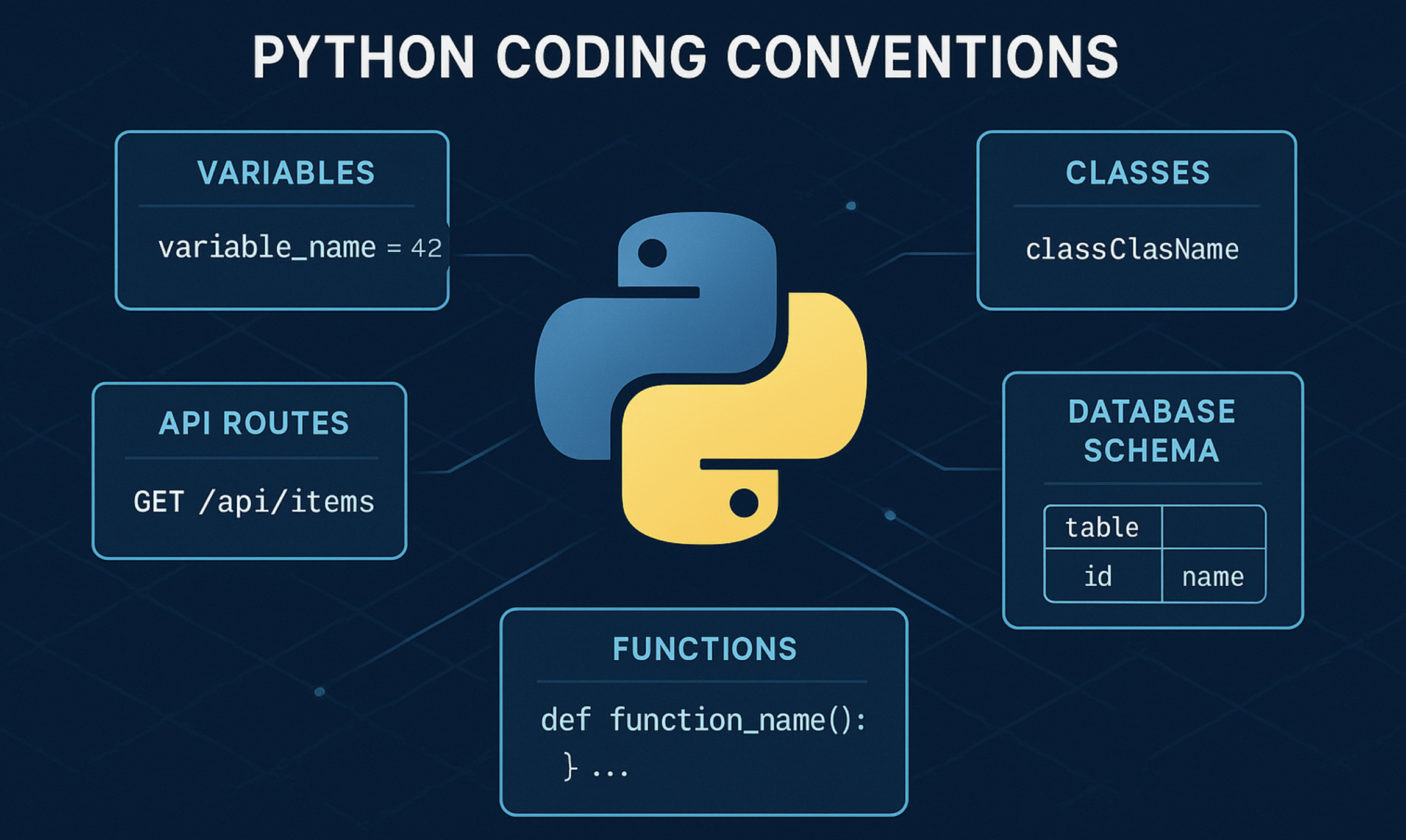
네이밍 규칙은 프로젝트 품질을 좌우한다
처음에는 네이밍 규칙이 어렵게 느껴질 수 있습니다.
하지만 프로젝트가 커지고 여러 사람이 함께 만들기 시작하면, 명확한 규칙의 필요성이 바로 느껴집니다.
좋은 네이밍은 코드를 더 읽기 쉽게 만들고, 문제를 빠르게 찾을 수 있게 도우며, 개발자의 생산성을 크게 높여줍니다.
오늘 소개한 규칙은 Python뿐만 아니라 대부분의 현대 개발 환경에서도 통용되므로, 지금부터 적용해 두면 앞으로 큰 도움이 될 것입니다.
'AI 코딩' 카테고리의 다른 글
| [Claude] Claude Code MCP 완벽 가이드 (0) | 2025.11.28 |
|---|---|
| [Claude] CLAUDE.md 완전 해부 - 프로젝트 관리 기반 실전 가이드 (3) | 2025.11.21 |
| [개발환경] pyenv - Python 버전을 전환하면서 사용하기 (6) | 2025.11.05 |
| [Claude] Claude Skill기능으로 문서작업 효율 10배 높이기 (1) | 2025.11.03 |
| [개발환경] homebrew를 활용한 python버전 전환 (8) | 2025.10.30 |


